OBS Alternative: Is Any Paid App Worth Switching To?

Which OBS Alternative Fits Which Job · OBS Studio vs XSplit, vMix, Camtasia and Bandicam: Specs Table · Pricing: What Each OBS Alternative Costs in November 2026 · Why Creators Look for an OBS Alternative, and When to Stay · XSplit Broadcaster: The Closest Windows Swap · vMix: Live Production, With a 30 Preview in the Queue · Camtasia: When the Job Is a Tutorial, Not a Stream · Bandicam 2027: A Recorder With an AI Editor Attached · Streamlabs, Wirecast, Ecamm and Other Names You Will See · What the Published Numbers and Limits Show · Seven Setups and the Pick for Each · Pros and Cons Side by Side · Migration Guide: Moving From OBS to Another Tool · Verdict: Is Any OBS Alternative Worth the Switch? · Common questions
OBS Studio costs $0, and the 33.0 line is the release obsproject.com lists as current on November 20, 2026. Any OBS alternative has to beat free at something specific: a built-in editor, a lifetime license, a Mac-first interface, a vendor you can contact. This comparison checks four main rivals against that bar, plus three smaller names.
The short version: XSplit Broadcaster is the nearest like-for-like swap on Windows, vMix suits multi-camera productions, Camtasia and Bandicam fit people who record more than they stream, and OBS stays the pick for anyone without a hard reason to leave. Version details for OBS itself sit in our OBS Studio update breakdown, so this piece spends its words on the rivals.
Below you get a specs table, a pricing table with three-year costs, a read on each vendor, seven sample setups, a migration plan and a verdict. Every table carries the date it was checked, November 20, 2026.
Which OBS Alternative Fits Which Job
Pick by job, not by feature count. Each of these tools was built around one main task, and that task is the fastest filter. Here is the mapping, before any detail.
- Closest Windows swap for live streaming: XSplit Broadcaster.
- Multi-camera shows with a real switcher: vMix (the newest build is a preview, so read the vMix section first).
- Tutorials, courses and training videos: Camtasia.
- Quick screen, game and webcam capture with an editor attached: Bandicam 2027.
- Live streaming on a Mac: Ecamm or Wirecast.
- Free, Linux or plug-in heavy: stay on OBS Studio.
If none of those lines describes you, stay put. The case against switching is simple arithmetic. OBS charges nothing, runs on Windows, macOS and Linux, and has the largest plug-in ecosystem of any tool here. A replacement has to give you something you cannot get from a plug-in.
Three questions narrow the field quickly. First, do you stream live, or only record? Live work points to XSplit, vMix, Wirecast or Ecamm, while recording work points to Camtasia or Bandicam. Second, which operating system do you edit and stream on? Bandicam, XSplit and vMix are Windows applications, Camtasia covers Windows and Mac, and Ecamm is Mac only. Third, do you want editing in the same window as capture? Camtasia and Bandicam 2027 say yes, the live tools say no.
One more filter belongs on the list: how you like to pay. Some creators hate subscriptions and will accept a clunkier tool to avoid one. Others want a vendor with a support desk and happily pay monthly. The pricing section below puts numbers on both choices.
OBS Studio vs XSplit, vMix, Camtasia and Bandicam: Specs Table
The table below lines up the five main contenders on twelve attributes. Cells say Not confirmed where the vendor pages we fetched on November 20, 2026 gave no clear answer. That is deliberate. A guess in a spec table ages badly.
| Spec (checked Nov 20, 2026) | OBS Studio | XSplit Broadcaster | vMix | Camtasia | Bandicam |
|---|---|---|---|---|---|
| Main job | Live streaming and recording | Live streaming and recording | Live production, switching, streaming, recording | Screen recording and video editing | Screen, game and webcam recording |
| Platforms | Windows, macOS, Linux | Windows | Windows | Windows and Mac | Windows |
| Newest version checked | 33.0 line | 4.6.2609.2802 (October 2026 release) | vMix 30 Preview, 30.0.0.22 Beta (Nov 4, 2026) | 2027 generation (macOS 2027.0.0, Nov 10, 2026) | Bandicam 2027 (announced Sep 10, 2026) |
| License model | Free, open source | Free and Premium tiers, Premium monthly, yearly or lifetime | Perpetual editions, 12 months of updates on upgrade | Annual subscription for new customers | Free version, paid activation |
| Free option | Yes, no limits | Yes (Free vs Premium) | Not confirmed | Free download, check TechSmith for export terms | Yes, 5-minute recordings, no watermark |
| Built-in editing | None | Not the focus | Not the focus | Full editor | Playback and editing added in 2027 |
| Live streaming | Yes | Yes (Twitch, YouTube, Kick tools) | Yes | Not its focus | Not its focus |
| Scene or source switching | Scenes | Scenes plus Presentation Switcher | Full switcher, MultiView layouts of 10, 12 and 24 inputs in the 30 Preview | Not applicable | Not applicable |
| AI features | None built in, plug-ins add some | None headlined in the October release | None listed in the 30 Preview notes | AI-powered per TechSmith, Audiate for text-based editing | Transcription, subtitles, Smart Zoom, webcam background effects |
| Hardware encoding notes | NVENC, AMF, QSV and x264 choices | Intel Arc Quick Sync H.264 and H.265 for Twitch Enhanced Broadcasting | FFmpeg 8.1.1 decoders with AV1 playback in the preview | Not confirmed | Not confirmed |
| Maker | OBS Project | XSplit | vMix | TechSmith | Bandicam Company |
| Latest notable change | 33.0 line is current | October 2026 release with Presentation Switcher | Preview build announced Nov 4, 2026 | macOS recording architecture update, Nov 10, 2026 | AI transcription and editing suite, Sep 10, 2026 |
Read the table by rows, not columns. The Main job and Platforms rows eliminate most options before price enters the conversation. A Linux user has exactly one choice here, OBS. A Windows streamer who wants a supported commercial app has three. A Mac user wanting a built-in editor lands on Camtasia.
Two rows carry caveats. The vMix version is a preview build that vMix itself says should not be used for production, so the stable build you would buy today is older than the one in the table. The Camtasia row shows the 2027 generation because TechSmith publishes 2027 version-history pages for both platforms, though one comparison still lists 2026.2.5 as the latest, a sign that trackers lag the vendor.
Pricing: What Each OBS Alternative Costs in November 2026
OBS costs $0. Everything else in this table is a trade of money for a feature, a support channel or a license model. Prices come from vendor pages where we could fetch them and from named comparison sites where we could not, and the table says which.
| Tool | Price signal | Billing | Source and note (checked Nov 20, 2026) |
|---|---|---|---|
| OBS Studio | $0 | Free, open source | obsproject.com |
| XSplit Broadcaster Premium | $14.99/month, $59.99/year, $119.99 lifetime | Monthly, yearly or one payment | A comparison published Nov 15, 2026 cites XSplit pricing page |
| XSplit Broadcaster Lifetime (promo) | US$79.99 | One payment, no renewals | XSplit Black Friday and Cyber Monday 2026 page, published Nov 17 |
| vMix | Perpetual editions | One payment, 12 months of updates when you upgrade an edition | vMix site and forum, edition prices not confirmed (pricing page returned not found) |
| Camtasia | Essentials, Create and Pro plans plus a business license | Annual subscription for new customers | TechSmith support and product page, plan prices not confirmed |
| Bandicam | Free version, paid activation | See bandicam.com | Free recordings capped at 5 minutes, price not confirmed |
| Streamlabs Ultra | $27/month or $189/year ($15.75/month) | Monthly or yearly | Reported by a comparison dated Nov 15, 2026 |
| Ecamm | $192 and $384 annual payments | Annual | Listed on ecamm.com/pricing, plan names not captured |
| Wirecast | Subscription | See telestream.net | Prices in text below, single source |
TechSmith moved Camtasia to an annual subscription model in 2025, and its support article on the 2025 pricing transition explains the change for new customers. One comparison reports an Essentials plan at $179.88 a year and a capture-only Starter plan at $39 a year, but that is a single source, so check TechSmith before you budget around it.
Wirecast prices also come from one comparison. It reportedly lists Wirecast Studio at $34 a month on annual billing and $59 a month on a month-to-month plan. vMix edition prices are reported by one comparison too, ranging from $60 for Basic HD to $1,200 for Pro as lifetime licenses, with a vMix MAX plan at $50 a month. Treat those as pointers, not quotes.
Three-year cost for the tools with firm prices
Subscriptions look cheap until you multiply. The next table holds prices constant, which is a simplification, and shows what each option costs over one and three years.
| Option | Year 1 | Year 3 (total) |
|---|---|---|
| OBS Studio | $0 | $0 |
| XSplit Premium, paid monthly ($14.99) | $179.88 | Not listed |
| XSplit Premium, paid yearly ($59.99) | $59.99 | Not listed |
| XSplit Lifetime, regular ($119.99) | $119.99 | $119.99 |
| XSplit Lifetime, Black Friday promo ($79.99) | $79.99 | $79.99 |
| Streamlabs Ultra, paid monthly ($27) | Not listed | Not listed |
| Streamlabs Ultra, paid yearly ($189) | $189.00 | Not listed |
| Ecamm, lower listed annual payment ($192) | $192.00 | Not listed |
| Ecamm, higher listed annual payment ($384) | $384.00 | Not listed |
The arithmetic gives a few clear rules. XSplit Lifetime at $119.99 pays for itself against the yearly plan in two years and against the monthly plan in eight months. The $79.99 promo cuts the yearly-plan break-even to about 16 months. Streamlabs Ultra is listed at $27 a month or $189 a year, so yearly billing is the cheaper route. Paying for an annual plan beats paying monthly in every case in this table.
Why Creators Look for an OBS Alternative, and When to Stay
The reasons for leaving fall into a short list. The reasons for staying fall into an even shorter one, and it usually decides the question.
Reasons that justify a switch
You need editing in the same app as capture. OBS records files and stops there. Camtasia and Bandicam 2027 both fold an editor into the recorder, which saves an export and import step per video. For a creator who publishes tutorials weekly, that step adds up.
You want a vendor with a support desk. OBS support runs through community channels. XSplit, vMix, TechSmith and Telestream sell support, and a business that streams to paying customers may value a ticket queue over a forum thread. Telestream, for example, reportedly states on its Wirecast support page that an active support plan or subscription is required to contact support, which is the point of paying.
You run a Mac-first or switcher-first workflow. Ecamm targets Macs. vMix exposes a classic broadcast switcher with MultiView layouts. Those are shapes of workflow, not features you can bolt onto OBS with a plug-in.
You want a one-time purchase with no renewals. XSplit Lifetime and vMix perpetual editions deliver that. OBS beats both on price, but a few people want a commercial license on paper for client work.
Reasons that do not
You think a paid tool will fix dropped frames. Dropped frames usually come from encoder choice, bitrate, GPU load or network upload, not from the logo on the app. Check those settings first, because the same hardware drives every tool in this guide.
You want a nicer interface. That is a real preference, but a skin on top of the same capture engine rarely changes output quality. Browse the OBS and screen recording section for settings guides before paying for a new app.
XSplit Broadcaster: The Closest Windows Swap
XSplit Broadcaster is the most direct OBS alternative for a Windows streamer. It does live streaming and local recording in one application, uses scenes and sources the way OBS does, and sells a Free and a Premium tier. XSplit is not retired, renamed or acquired as far as any official page we fetched shows.
The latest stable build we could verify is XSplit Broadcaster 4.6.2609.2802 from the October 2026 release. XSplit announced that update on October 9, 2026. The release notes list a Presentation Switcher for changing between setups such as gaming and podcasting, Twitch Enhanced Broadcasting extended to supported Intel Arc “Alchemist” and “Battlemage” discrete GPUs with Intel Quick Sync H.264 and H.265, a Kick Chat Viewer, YouTube Gifts in the Stream Dashboard and YouTube Live Alerts, and improved Stream Deck controls for Multi Output Mode.
Two smaller changes matter to people who record. Multitrack audio recording is now on by default for new local-recording setups, which helps anyone who wants to separate game, voice and music tracks in an editor. And the Video Playlist feature is now called Media Playlist, so old tutorials will point you at a menu that has a new name.
A newer beta exists. XSplit lists 4.6.2610.2001 on its beta page. It improves AV1 playback and presentation export handling and adds Stream Deck microphone and speaker volume controls. On October 16 the beta channel added X Live Streaming, which lets an eligible account sign in with X and set up a stream inside the app. Betas can break, so a channel that earns money should stay on stable.
Earlier in 2026 XSplit shipped a Spout2 source for VTuber workflows in January, Live Captions and AI Voice Clarity in May, and improved Game Capture reliability for DirectX 12 titles in June, according to the XSplit release notes. Those dates rest on a single source, so confirm them in the release-notes archive before you plan around them.
On price, XSplit is the cheapest paid option here. A comparison published November 15, 2026 reports Premium at $14.99 a month, $59.99 a year or $119.99 for a lifetime license. XSplit’s own Black Friday and Cyber Monday page lists Broadcaster Lifetime at US$79.99 and states “One payment. No renewals.” If you want a paid tool and you are on Windows, this promo is the lowest entry price in the article.
The weak spot is platform reach. There is no Mac or Linux build, so a team with mixed machines cannot standardize on it. It is also not built around a timeline editor, so you still export to an editor for polish.
vMix: Live Production, With a 30 Preview in the Queue
vMix is a Windows live-production application. It handles switching between cameras, recorded clips, titles and remote guests, then records or streams the mix. It is less an OBS alternative for solo streamers and more a replacement for a hardware switcher.
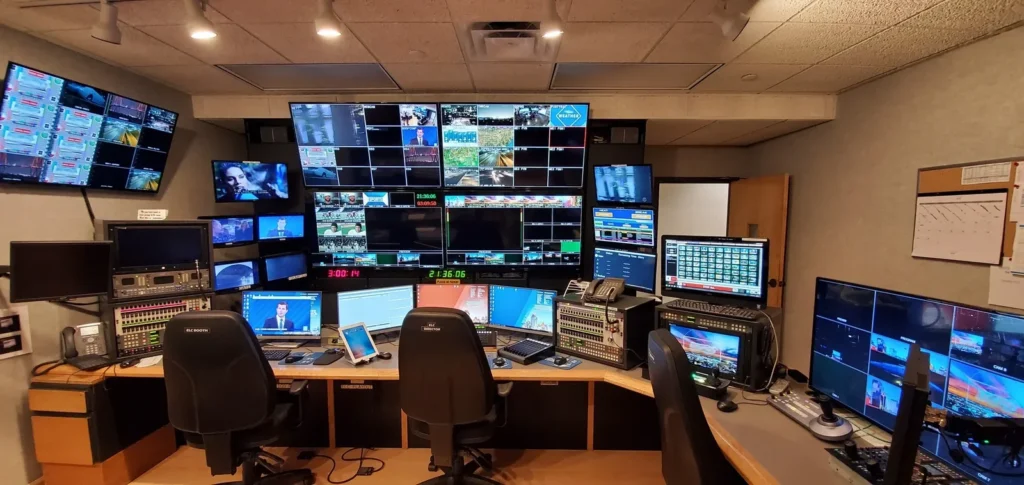
The newest build is vMix 30 Preview, version 30.0.0.22 Beta, announced on the vMix forum on November 4, 2026. vMix labels it a preview with possible bugs and says it should not be used for production. The reported additions are tally passthrough for Mix Inputs, production-clock messages and shortcuts, new 10-, 12- and 24-input MultiView layouts, and title-preset management improvements.
The preview notes also list updated components. NDI moves to version 6.3.2, with NDI 6.4 promised once NDI releases it, including recording NDI directly to MKV in MultiCorder. The built-in FFmpeg decoders move to 8.1.1 for newer formats including AV1 video, and the preview adds support for the 119.88 frame rate. Those lines come straight from the vMix forum post.
The newest vMix build on record is the vMix 30 Preview, version 30.0.0.22 Beta.
vMix uses perpetual-edition licensing rather than a confirmed subscription model. An edition upgrade, such as HD to 4K, includes 12 months of free updates, and updating after that window follows vMix’s update eligibility rules. vMix lifetime edition prices (reportedly $60, $350, $700 and $1,200 for Basic HD, HD, 4K and Pro) sit in the single-source tier.
vMix also posts a laptop buying guide on its own site. It says the December 2025 NVIDIA driver, version 591.44 WHQL, appears to have raised the number of NVENC encodes to 12. That is vMix’s own observation and not an independent benchmark, but it shows how the company thinks about hardware: in concurrent encodes, not in a single stream.
On October 28, 2026, vMix reported attending NAB New York 2026 and showing touchscreen control and MultiView. The company is active. The friction for a hobbyist is the Windows-only restriction and the edition-based licensing.
Camtasia: When the Job Is a Tutorial, Not a Stream
Camtasia is the one tool here that is not trying to replace OBS for live streaming. TechSmith’s own materials position it as a screen recorder and video editor, and the facts we collected say its 2026 changes lean toward training-video workflows, text-oriented editing through Audiate, collaboration and enterprise administration.
Product naming has shifted. TechSmith’s support pages list Camtasia Editor for desktop recording and editing, Camtasia Audiate for text-based editing and audio cleanup, Camtasia Online for browser-based collaboration, and a broader Camtasia Suite brand. Expect to see Camtasia and Camtasia Editor used for the same desktop app.
The 2027 generation arrived in November. TechSmith’s support site carries 2027 version-history pages for Windows and Mac, and macOS 2027.0.0 is dated November 10, 2026, with an updated recording architecture aimed at reliability. The Mac version history also lists SVG Tiny 1.2 rendering support and compatibility with macOS 27 “Golden Gate”. One report says Windows 2027.0.0 shipped the same day with color-emoji support in text callouts and .NET 10, and that Mac 2027.0.1 followed on November 16 with a crash fix. Both claims are single-source.
On cost, new customers buy an annual subscription. TechSmith explains the 2025 shift on its annual subscription transition page, which is the primary source for that policy. TechSmith lists paid Essentials, Create and Pro plans plus an Editor Business License. The product page also says the free version gives you the full editor but watermarks exported videos until you upgrade, which is a single-source detail to confirm before you rely on it.
Where it falls short: it does not target live streaming, and it carries subscription pricing for new buyers. If you stream on Twitch and also publish polished tutorials, the practical setup is OBS for the stream and Camtasia for the course, not one tool for both.
Bandicam 2027: A Recorder With an AI Editor Attached
Bandicam began as a lightweight Windows screen recorder and now bills itself as a recording, editing and AI production suite. Bandicam Company announced Bandicam 2027 on September 10, 2026. Nothing in the retrieved official pages shows a rename, retirement or acquisition.
The 2027 release adds built-in video and audio playback and editing, AI transcription, subtitle tools, Smart Zoom, AI webcam background effects, AI-assisted highlight and silence editing, subtitle translation, summaries, quizzes and more webcam-shape options. Bandicam says the AI features use local models plus cloud-based premium services called Bandicam AI and AI+, which run on AI credits. Credit pricing is not on the pages we fetched.
The free version has clear limits, stated on Bandicam’s own download page. Free recordings are limited to 5 minutes each with no watermark, and edited video exports, including subtitled videos, carry a watermark. Activating Bandicam 2027 removes the recording time limit. For anyone recording a one-hour lesson, the free version does not work.
Bandicam also launched Bandicam AI Studio, a generative video platform with an AI Director, and ZunShot, a Windows screenshot and annotation tool that installs in under 8 MB. Neither replaces OBS. They show where the company is investing: AI post-production, not live production.
Is it an OBS alternative? For recording, yes. For live streaming, no, because Bandicam is presented as a recorder. A gameplay recorder who wants captions and a quick cut without opening a second program is the target reader. A streamer who needs scenes, alerts and a chat dock is not.
Check the version before you buy. One source reports Bandicam 2027 build 27.0.7, but the research flagged that number as unconfirmed against the official download page, so we leave it out of the specs table.
Streamlabs, Wirecast, Ecamm and Other Names You Will See
Four more names show up on every OBS-alternatives list. The table keeps to what the sources support.
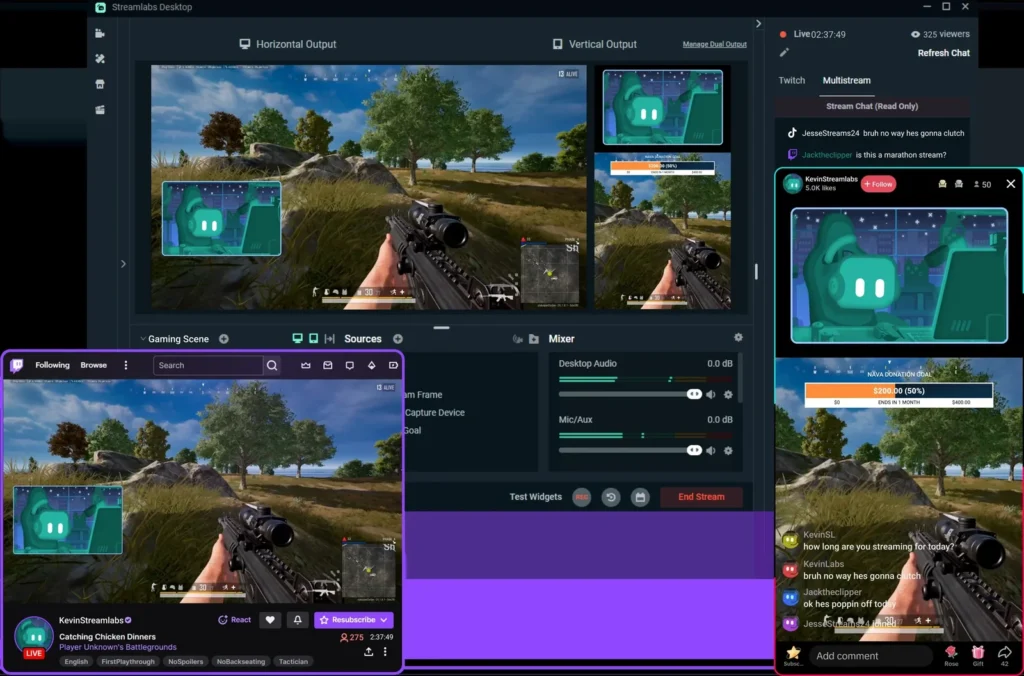
| Tool | Main job | Platform | Price signal (checked Nov 20, 2026) |
|---|---|---|---|
| Streamlabs Desktop | Streaming and recording with a free app and a paid Ultra membership | Desktop app | Free, Ultra $27/month or $189/year |
| Wirecast (Telestream) | Multi-camera streaming and remote guests, commercial live production | Mac and PC | Subscription, see telestream.net |
| Ecamm | Live streaming on Mac for social platforms | Mac only | $192 and $384 annual payments listed |
| Meld Studio | Newer drag-and-drop streaming app often listed beside OBS | Not confirmed | Not confirmed |
Streamlabs Desktop is a free application with a paid Ultra membership, and it is active. Ultra costs $27 a month, or $189 a year, which equals $15.75 a month. Do not quote $27 as the only price, because annual billing cuts the monthly cost by 42 percent. We covered the Desktop-versus-OBS tradeoffs in a separate comparison.
Wirecast, from Telestream, is a commercial live-production tool for Mac and PC. One comparison reports Wirecast Studio at $34 a month billed annually and $59 a month month-to-month. That points to a subscription product.
Ecamm is the Mac pick. Its site presents a live-streaming platform for Mac, lists annual payments of $192 and $384, and shows a 4.9 out of 5 rating that Ecamm reports from its users. We did not retrieve a current Ecamm release note, so we cannot say which version is newest. If you stream from a MacBook and want a single polished app, it is worth a trial.
Meld Studio shows up in competing lists as a desktop streaming app, but our fact sheet holds no verified release or pricing data for it, so we make no claims beyond the name. Browser-based studios such as StreamYard and Restream appear in the same lists. They suit guest interviews and multistreaming from a browser tab, a different job from desktop capture.
ShareX, ScreenSnap Pro and ScreenPal also appear in rival roundups. We leave them out of the table for the same reason: no verified current data. Check each vendor’s own pages before you trust a third-party ranking, including this one.
What the Published Numbers and Limits Show
No source we found publishes a cross-tool benchmark for CPU use or dropped frames between OBS, XSplit, vMix, Camtasia and Bandicam. Anyone selling you a precise percentage is guessing or measuring one machine. What the vendors do publish are limits, version facts and encoder notes, and those are worth a table.
| Source (checked Nov 20, 2026) | Published number or limit | What it means for a creator |
|---|---|---|
| XSplit October 2026 release notes | Multitrack audio recording on by default for new local setups | Separate game, voice and music tracks without a settings visit |
| XSplit October 2026 release notes | Twitch Enhanced Broadcasting on Intel Arc with Quick Sync H.264 and H.265 | Arc GPU owners get hardware-encoded Twitch streaming |
| vMix 30 Preview forum post | 119.88 frame rate support, FFmpeg 8.1.1 decoders with AV1 playback, NDI 6.3.2 | Wider format and frame-rate playback, in a build marked not for production |
| vMix laptop buying guide | December 2025 NVIDIA driver 591.44 WHQL appears to raise NVENC encodes to 12 | More concurrent hardware encodes on supported cards, per vMix |
| vMix 30 Preview forum post | MultiView layouts of 10, 12 and 24 inputs | Larger monitoring walls for multi-camera shows |
| Bandicam download page | 5-minute free recordings, no watermark, watermark on edited exports | Free tier suits clips, not long sessions |
| TechSmith version history | macOS 2027.0.0 dated Nov 10, 2026 with updated recording architecture | A recent reliability-focused change on Mac |
Three sources stand out as the most useful: XSplit’s release notes, vMix’s own forum and TechSmith’s version history. All three come from the maker, which means they describe intent and capability, not independent measurement. Use them to rule tools in or out, then test on your own machine.
The encoder row deserves a second look. Frame drops depend on the encoder as much as the app. NVENC, AMF, QSV and x264 give very different CPU and GPU loads on the same hardware, and every tool in this guide can use hardware encoding. If your stream stutters in OBS, switching apps rarely fixes it. Lowering resolution, dropping bitrate or changing the encoder usually does.
The limits row hides a second trap: free tiers are not equal. Bandicam’s free tier removes the watermark from raw recordings but caps them at 5 minutes. The Camtasia free download reportedly watermarks every export. OBS has neither limit. When a reviewer says free, ask what the free tier cuts.
Seven Setups and the Pick for Each
These scenarios use the vendor facts above. They are illustrative setups, not case studies of named creators.
1. Solo Twitch streamer on Windows with an Intel Arc GPU
This streamer wants hardware-encoded Twitch streaming and a one-time purchase. XSplit fits on both counts. Its October 2026 release expanded Twitch Enhanced Broadcasting to Intel Arc “Alchemist” and “Battlemage” GPUs, and the Black Friday Lifetime price is US$79.99. The risk is a Windows-only lock-in.
2. Church or school multi-camera livestream
Three cameras, a lyrics display and a volunteer operator point to vMix. The preview adds 24-input MultiView and tally passthrough, but the stable build is what a Sunday service should run. vMix says the 30 Preview is not for production, so wait for the final release or stay on the stable build.
3. Online course creator on a Mac
A creator who records screencasts and edits narration wants one tool for both. Camtasia covers Windows and Mac, with macOS 2027.0.0 dated November 10, 2026 and a Mac version history that mentions macOS 27 “Golden Gate” compatibility. The cost is an annual subscription, so budget for it as a yearly business expense.
4. Gameplay recorder who needs captions
Bandicam 2027 records the game, transcribes the audio and builds subtitles in the same program. The free version caps recordings at 5 minutes and watermarks edited exports, so a creator posting 20-minute videos needs the paid activation.
5. Mac podcaster streaming with remote guests
Ecamm targets Macs and live social streaming, and Wirecast covers Mac and PC with remote guests. Both are subscription products. Ecamm lists $192 and $384 annual payments, and Wirecast reportedly starts at $34 a month on annual billing. A podcaster who streams weekly should start with trials.
6. Linux workstation or a no-budget channel
Only OBS runs on Windows, macOS and Linux and costs $0. Nothing in the other tools’ pricing justifies leaving when the budget is zero and the machine runs Linux.
7. A freelancer who needs a lifetime license
A freelancer who hates renewals compares XSplit Lifetime at $119.99 (or $79.99 in the current promo) with vMix perpetual editions. XSplit is cheaper by a wide margin. vMix gives a broadcast switcher and 12 months of updates on each edition upgrade. The choice follows the job: streaming for one, live production for the other.
Pros and Cons Side by Side
The table below compresses the sections above into one view. Each cell comes from a fact already cited.
| Tool | Pros | Cons |
|---|---|---|
| OBS Studio | $0, open source, Windows, macOS and Linux, plug-in ecosystem | No built-in editor, community support only |
| XSplit Broadcaster | Lowest paid entry, lifetime option, Intel Arc Enhanced Broadcasting, multitrack audio default | Windows only, no timeline editor |
| vMix | Real switcher, MultiView layouts, perpetual license | Windows only, newest build is a preview, edition-based licensing |
| Camtasia | Recorder plus full editor, Windows and Mac, 2027 generation out | Subscription for new buyers, not a streaming tool |
| Bandicam 2027 | Recording plus AI transcription, subtitles and Smart Zoom, free 5-minute tier | Windows only, AI runs on credits, free exports watermarked |
| Streamlabs Ultra | Free app, annual price $15.75/month equivalent | Paid tier costs $27/month if billed monthly |
| Wirecast | Multi-camera and remote guests, Mac and PC | Subscription product, no verified price |
| Ecamm | Mac-focused streaming app | Mac only, current release notes not verified |
The pattern is consistent. Free tools cost you time, commercial tools cost you money, and the AI-heavy recorders cost you credits. A creator choosing between them is really choosing which of the three to spend.
Migration Guide: Moving From OBS to Another Tool
Plan an hour for the move, plus a test stream or a test recording before anything goes live. None of the vendor pages we checked documents an OBS scene import, so assume you rebuild scenes by hand.
- Back up OBS first. Export your scene collection and profile so you can return in minutes if the new tool disappoints.
- List your sources. Note every display capture, game capture, webcam, microphone, browser source and media file, with each source’s position and size.
- Record your output settings. Write down resolution, frame rate, encoder, bitrate and audio tracks. Use the same numbers in the new tool so you compare like with like.
- Rebuild one scene. Start with your main scene and test a 2-minute recording before building the rest.
- Check audio. Confirm microphone and desktop audio levels and, in XSplit, the multitrack setting that is now on by default for new local setups.
- Run a private test. Stream to an unlisted or test stream for 10 minutes and watch for dropped frames and audio drift.
- Switch the live channel last. Keep OBS installed for a month. A fallback costs nothing.
OBS backup before you switch
  Scene Collection > Export   (saves your scenes and sources)
  Profile > Export            (saves resolution, frame rate, encoder, bitrate)
  Copy both files to a folder outside the OBS install
Animated openers and logo stings travel as plain video files, so they move across tools unchanged. If your scenes include one, keep the source file and re-add it as a media source in the new app. Vipid’s intro themes list the resolution, length and frame rate for each design, which makes it easy to match the opener to your new output settings.
From the Vipid archive
Vipid’s animated logo intro theme is one example of a short logo opener you would load into any of these tools as a video source.
Verdict: Is Any OBS Alternative Worth the Switch?
For most creators, no. OBS Studio costs $0, runs on three operating systems and carries the current 33.0 line, so a paid tool has to earn its place with a specific advantage. The data above shows five cases where it does.
- Multi-camera live production: vMix, on the stable build, with the 30 Preview left alone until it ships as final.
- Tutorial and course creator: Camtasia, on its annual subscription, for the built-in editor on Windows and Mac.
- Gameplay recorder who needs captions: Bandicam 2027, paid, since the free tier stops at 5 minutes.
- Mac live streamer: Ecamm or Wirecast, after a trial.
The deciding data points are simple. Price: $0 against paid tools that charge for a license or subscription, depending on tool and billing. Platform: Linux means OBS, Mac means Camtasia, Ecamm or Wirecast. Editing: only Camtasia and Bandicam 2027 bundle one. And support: only the commercial tools sell it.
That is a recommendation rather than a benchmark result, since the sources hold no independent cross-tool performance data. Keep OBS installed, test one rival for a week on your real workload, and switch only if it removes a task from your weekly routine.
Common questions
What is the best OBS alternative?
It depends on the job. XSplit Broadcaster is the closest Windows swap for live streaming, vMix suits multi-camera production, Camtasia suits tutorials and Bandicam 2027 suits recording with built-in editing. For most people with no hard reason to leave, OBS Studio remains the best choice because it costs $0.
Is there a free OBS alternative?
Streamlabs Desktop is a free application with a paid Ultra membership. Bandicam has a free version limited to 5-minute recordings with no watermark, though edited exports are watermarked. OBS itself is free and open source.
Does XSplit offer a lifetime license?
Yes. XSplit’s Black Friday and Cyber Monday 2026 page lists Broadcaster Lifetime at US$79.99 as a single payment with no renewals. Check the page for the end date, since it is a campaign price.
Is vMix 30 ready for live production?
No. vMix 30 Preview, version 30.0.0.22 Beta, was announced on November 4, 2026, and vMix says it should not be used for production. Run the stable build for live shows.
Can Camtasia replace OBS for live streaming?
Not in practice. TechSmith positions Camtasia as a screen recorder and video editor, and its 2026 changes focus on training videos, text-based editing and collaboration rather than live production.
Does Bandicam have a recording time limit?
The free version caps each recording at 5 minutes with no watermark, and edited video exports carry a watermark. Activating Bandicam 2027 removes the time limit.
Which OBS alternatives run on a Mac?
Camtasia runs on Windows and Mac, Wirecast covers Mac and PC, and Ecamm is built for Mac. XSplit, vMix and Bandicam are Windows applications. OBS runs on Windows, macOS and Linux.
Can I import my OBS scenes into another app?
None of the vendor pages we checked documents an OBS scene import, so plan to rebuild scenes manually. Export your OBS scene collection and profile first so you can go back.
More from the Vipid blog
- OBS vs Streamlabs [2026]: $0 vs $27/mo for Ultra
- Starting Soon Screen: Canva, Placeit, OWN3D or Plain OBS?
- Twitch Chat Overlay Obs [2026]
- Free Twitch Overlays [2026]: 5 Sources, $0 vs $27/mo
- Your Video a channel-style intro theme
- Intro themes stream and channel intros
- Sample videos finished Vipid intros
- Vipid intro maker make a custom intro in the browser
Jonah Reyes
Jonah Reyes is the Editing & Export Editor at Vipid. He covers editing software, export settings and codecs, and the video specs of YouTube, Shorts, TikTok and Reels, plus OBS and screen recording. He builds Vipid’s spec tables from the platforms’ own documentation and re-checks them every 60 to 90 days, so the numbers in a guide match what the upload dialog actually accepts.