Is After Effects Free for Logo Animation? The Real Cost
Is After Effects Free for Logo Animation? · After Effects Plans and Prices in November 2026 · What After Effects 27.0 Adds for Logo Work · Logo Animation Free: Four Routes Against After Effects · DaVinci Resolve 21.2 and Blender as Free Routes · Canva and Adobe Express for Logo Animation Without a Timeline · What the Sources Show, and Where the Numbers Stop · Six Real-World Cost Scenarios · Render Settings for a Logo Reveal · Frame by Frame: A 4-Second Logo Reveal in After Effects · Migration Guide: Moving a Logo Reveal Between Tools · Pros and Cons of Each Route · Which Route Fits Which Creator · Verdict: Is Paying for After Effects Worth It? · Before You Render
Short answer: no. Adobe sells After Effects only as a subscription, and the one free way in is a 7-day trial of the full version. If you typed logo animation free into a search box hoping for a permanent free copy of After Effects, Adobe’s pages do not offer one. What you can get for $0 is a different tool that finishes the same job, with trade-offs you should know before you commit a weekend to it.
The timing matters this week. Adobe lists After Effects 27.0 as the current version in its November 10, 2026 security bulletin, and its Creative Cloud announcement from the same day brings an AI Assistant (beta) to After Effects. Adobe’s Creative Cloud Pro page also shows a Black Friday price that ends November 27, 2026, so the buy-or-skip decision now has a deadline attached.
This piece prices an After Effects logo animation honestly, lines it up against DaVinci Resolve, Blender, Canva and Adobe Express, and shows where the paid route earns its cost. We already compared After Effects against Rive and Lottie on file formats, so this one stays on money, limits and workflow. Prices and limits come from the vendors’ own pages as of November 20, 2026.
Is After Effects Free for Logo Animation?
No. Adobe’s After Effects page offers a 7-day free trial, and after those seven days a paid subscription is required. The trial is the full version with current updates, and it turns into a paid membership unless you cancel before it ends. There is no perpetual licence you can buy once and keep. Adobe does not present After Effects as permanently free anywhere on its product or plan pages.
Seven days is enough for one finished After Effects logo animation if you arrive prepared. It is not enough to learn the program from zero and also make something you are proud of. Keyframes, easing curves, shape layers and the render queue each take a few hours to feel natural. A first-timer who opens the trial with no assets will spend the first two days just finding things.
A logo reveal is a small job. Most are three to five seconds long, with one logo, one sound and one background. That is why the free alternatives deserve a fair look. You do not need a compositing powerhouse to scale a mark in, hold it and fade it out. You need clean timing, a vector logo and a sensible export.
Prepare before the trial clock starts. The trial runs on the calendar, not on hours of use. Seven days from sign-up is seven days, even if you only open the app on Saturday. So gather everything first:
- A vector version of your logo, ideally an Illustrator file with each shape on its own layer.
- Your brand colors as hex codes, and the font if the reveal includes a tagline.
- A sound effect or a short music sting, trimmed to the length you want.
- A storyboard with three beats: what happens in, what holds, what goes out.
- The delivery sizes you need, such as 16:9 for YouTube and 1:1 for social posts.
With those five items ready, a trial week is plenty. A workable plan looks like this. Day one, set up the composition and import the logo. Day two, build the entrance. Day three, build the hold and the exit. Day four, add sound and an accent. Day five, render the master and the delivery files. Days six and seven stay empty on purpose, as a buffer for a failed render, a client note or a forgotten size. Put the cancellation reminder in your calendar on day six.
Without those assets, you are paying for the privilege of being unprepared. And if you decide the work is not for you, the free routes below cost nothing to try.
After Effects Plans and Prices in November 2026
The cheapest permanent way to run After Effects is the single-app plan at $22.99 per month in the United States, on an annual commitment billed monthly. The same price shows on Adobe’s pages as of November 2026, and it is the base cost of any After Effects logo animation workflow. The table below lists every plan that touches this topic, with the free routes included as the baseline.
| Plan | US price | What it covers | Notes |
|---|---|---|---|
| After Effects free trial | $0 | Full version and current updates for 7 days | Converts to a paid plan unless canceled |
| After Effects, individual | $22.99/mo | Desktop After Effects | Annual commitment, billed monthly |
| After Effects for teams | $37.99/mo per license | After Effects with business features | Annual commitment, billed monthly |
| Creative Cloud Pro | $69.99/mo regular | After Effects plus 20+ apps | Annual, billed monthly |
| Creative Cloud Pro, Black Friday offer | $29.99/mo for the first year | Same bundle | Adobe’s page says the offer ends Nov 27 |
| Creative Cloud Pro, students and teachers | $19.99/mo for the first year | Same bundle | Eligibility check, then the regular student rate |
| Creative Cloud Pro for teams | $99.99/mo per license | After Effects plus 20+ apps for a team | Annual, billed monthly |
| DaVinci Resolve 21.2, free edition | $0 | Edit, color, Fusion and more | Output limited to Ultra HD or lower |
| Blender | $0 | 3D creation suite, open source | No licence fee for the core app |
| Canva Pro or Business, monthly | 50% off the first 3 months | Paid Canva tiers | New subscriptions only, offer ends Dec 4, 2026 |
Two cautions apply to the Adobe numbers. First, Adobe’s pages show several promotions at once, and at least one other listing reported a different introductory offer for Creative Cloud Pro, a $34.99 monthly price for the first three months. When listings disagree, the price at checkout wins, so confirm it there. Second, prices vary by country and tax. A UK page, for example, reportedly lists the single-app plan in pounds including VAT, and that figure should not be read as a global price.
Creative Cloud Pro replaced the older name Creative Cloud All Apps, so older guides that mention All Apps are describing the same bundle under its former name.
The math that surprises people: even at the $29.99 Black Friday rate, a year of Creative Cloud Pro comes to $359.88, while a year of the single After Effects plan comes to $275.88. If After Effects is the only Adobe app you will open, the bundle costs more even with the discount. If you also want Premiere, Photoshop and Illustrator, the bundle starts to make sense. The offer is also tied to the annual commitment, so read the cancellation terms before you click.
What After Effects 27.0 Adds for Logo Work
Version 27.0 is the current release, and Adobe also lists 26.5.3 as an updated maintenance release in the same security bulletin. Two additions matter for logo reveals. Neither changes the basics of keyframing, so a reveal built in an older version still opens and plays the same way.
The first is the After Effects AI Assistant, which Adobe describes as a beta. Adobe’s own announcement says it lets you describe what you need and run multi-step tasks in the context of your project, with you staying involved to refine the result. Reports on the release say it can organize projects and write or repair expressions. That last use is the one logo animators will feel. Expressions drive the loopable wiggle, the auto-fit text box and the staggered offsets that make a reveal feel designed rather than assembled. A broken expression is a classic time sink, and a repair tool that works would save real hours.
The second is a 3D change. Adobe’s notes say animated precompositions, solids, images and videos can now serve as material sources for 3D objects. For a logo, picture an extruded mark whose surface plays a moving gradient or a looping texture. Before this, you would fake that with layered tricks. Now the material itself can move.
Treat both with care. A beta is a beta, and a client deadline is a poor place to meet a new bug. Build your reveal the plain way first, then test the assistant on a duplicate of the project. If it fixes an expression, keep the fix. If it rewrites something you did not ask for, you still have the original.
Adobe also previewed MCP integrations, which would let a third-party AI agent that you already use call on After Effects, Photoshop, Illustrator and Premiere. It is a preview, not a shipping feature, so do not plan a workflow around it today. If it arrives, it will matter more to studios batching dozens of branded stings than to someone making one intro.
For the typical creator, 27.0 is not a reason to subscribe on its own. The reason to subscribe is the timeline, the shape layers, the graph editor and the render pipeline you already know. The new features are a bonus layered on a mature tool. If you are still on a 26.x build, nothing in a logo reveal forces the upgrade, and the maintenance release is the one to install if you stay put.
Logo Animation Free: Four Routes Against After Effects
If you want logo animation free of any subscription, four routes compete with After Effects for a logo reveal: the DaVinci Resolve free edition, Blender, Canva’s free tier and Adobe Express’s free tier. They solve different problems. The specs table below keeps the checked facts in one place. Rows marked as analysis are my assessment rather than a vendor claim.
| Spec | After Effects 27.0 | DaVinci Resolve 21.2 free | Blender | Canva and Adobe Express free tiers |
|---|---|---|---|---|
| Cost to start | $22.99/mo after trial | $0 | $0 | Free tiers exist |
| Free route | 7-day full trial only | Free edition, no expiry shown in the official notes | Free and open source | Free tier with limits |
| Billing model | Annual commitment, billed monthly | Not applicable to the free edition | No licence fee | Paid tiers: Canva Pro, Business, Express Premium |
| Perpetual licence | No, subscription only | Free edition needs no subscription | Open source | Hosted service |
| Current version | 27.0 | 21.2 | Rolling releases, check blender.org | No version number, November 2026 Express release |
| Animation model | Layers, keyframes, expressions | Fusion page, node-based | Full 3D scene plus timeline | Preset-driven, little timeline depth |
| 3D logo work | 3D layers, animated material sources | Not verified in this research | Core strength | Not a focus |
| Output cap | Set by your project | Ultra HD or lower | Set by your render | Not verified in this research |
| GPU rule | Not stated | One processing GPU on Windows and Linux | Not stated | Not applicable |
| AI features | AI Assistant (beta) | Studio edition lists AI tools | None verified | Express AI Assistant beta reaches Free users |
| Third-party assets | Check each template licence | Check each asset licence | Check each asset licence | Pro or crown assets need an upgrade |
| Team plan price | $37.99/mo per license | Not confirmed | Not applicable | Canva Business and Enterprise exist, prices not confirmed |
| Learning curve (analysis) | Moderate, huge tutorial base | Moderate, Fusion is its own world | Steep for beginners | Low |
| Best for (analysis) | Precision 2D reveals, expressions | Free 2D reveals inside an editor | 3D reveals and product-style logos | Quick template-based stings |
Read the table by job, not by column. If your logo is flat and your deadline is short, the free editions get you most of the way. If your logo needs depth, shine and a camera move, Blender or After Effects 3D becomes the realistic choice. If nobody on your team will ever open a timeline, the free tiers of Canva and Express are the honest answer, with the limits that come with them.
DaVinci Resolve 21.2 and Blender as Free Routes
DaVinci Resolve 21.2 and Its Fusion Page
Blackmagic’s official notes describe the free edition and the paid Studio edition as Resolve 21.2. The free edition supports media of unlimited resolution, but it limits mastering and output to Ultra HD or lower, and it supports one processing GPU on Windows and Linux. The notes show no subscription requirement and no 7-day expiry for the free edition. For a logo reveal, the Ultra HD ceiling does not bite, since a typical intro fits well under it.
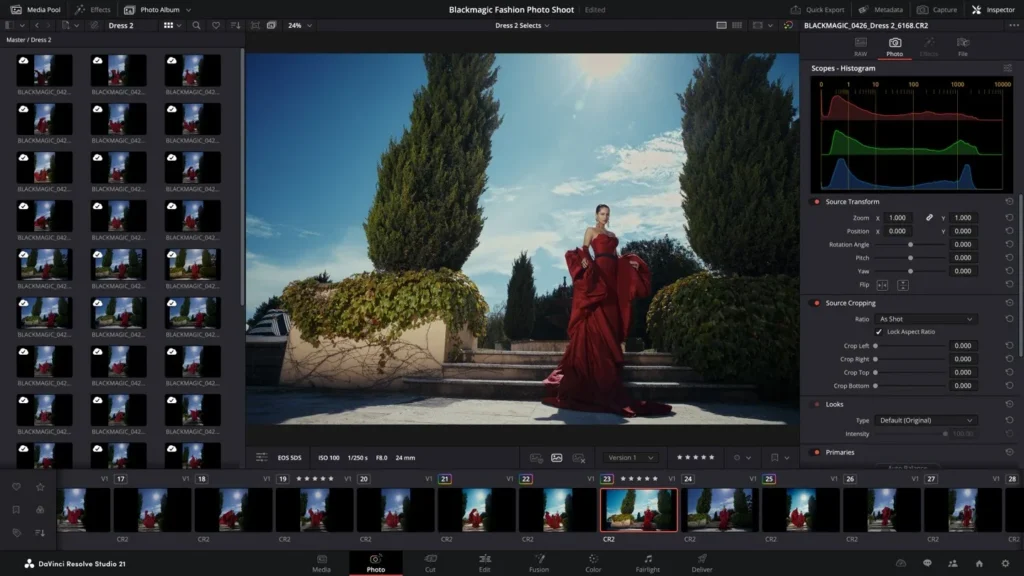
Motion graphics live on the Fusion page, which is node-based. That is a different mental model from After Effects layers. Nodes suit people who like to see a graph of operations. Layers suit people who think in a stack. Neither is better, but switching costs a few evenings. The upside is that the reveal lives in the same program as your edit, so there is no round trip.
Read the Studio feature list before you design. The official notes list motion blur, noise reduction, extra Resolve FX, camera tracking and AI tools among the capabilities Studio adds. Check whether the blur you want sits in the free edition before you plan a fast whip-in, because a quick move without blur can look steppy at 24 or 25 frames per second. Slower easing is the cheap fix. Blackmagic’s Studio price was not confirmed in the research for this article, so check its site directly. Reports from October mention special pricing and a price increase, which makes the current figure worth verifying.
Blender for 3D Logo Reveals
Blender is a free, open-source 3D creation suite covering modeling, animation, rendering and compositing, and it is a proven route for 3D logo reveals. Blender’s official video channel reportedly presented Blender 5.3 as released on November 10, 2026. Third-party assets are a separate licence question, because the core app being free says nothing about a model pack or texture library you download.
Blender earns its place when the logo needs real depth. Extruded letters, glass, metal, a rotating camera and soft shadows are all native territory. It is overkill for a simple fade. Opening a full 3D suite to scale a flat mark from 80 to 100 percent is like renting a truck to carry a lunch box.
If you are new to 3D, budget extra time. A basic extruded-logo reveal in Blender is an afternoon for someone who has done it before and a long weekend for someone who has not. The payoff is a result that After Effects cannot match without help from outside tools. Our guide to free logo animation tools covers more of the no-cost field if neither Resolve nor Blender fits.
Canva and Adobe Express for Logo Animation Without a Timeline
Canva and Adobe Express make sense when the person making the logo reveal is not an animator. Both are template-first, browser-first and quick. Neither replaces After Effects for keyframe control, compositing or expressions, and Adobe’s own pages do not confirm a dedicated After Effects-style logo-reveal feature in Express.
Canva‘s free tier is reported to let you animate text, shapes and images, and to export MP4 up to 1080p without a watermark as long as the project uses only free or user-owned assets. That caveat is the catch. Anything marked Pro or with a crown needs an upgrade or a licence, and one stray premium element in your logo sting can block a clean export. Canva also lists a limited promotion of 50 percent off Pro or Business monthly plans for the first three months, for new subscriptions, with the offer ending December 4, 2026.
Adobe Express has a Free plan and a Premium plan. Its November 2026 release adds a conversational AI Assistant, brand creation from a PDF or an image, and brand checks, and its release notes say the AI Assistant beta is open to Free-plan users. The brand tools help here. A logo reveal that follows your colors and fonts reads as part of a family of videos, and brand checks catch the accidental off-palette shade before it ships. Express does not make After Effects free, and Adobe’s material does not claim it does.
Canva also reportedly announced the acquisition of Cavalry, a procedural motion design app, in February 2026. That is worth watching rather than a product you can use today inside Canva, so treat it as context, not as a feature.
When does the template route win? When you need the reveal tomorrow, the logo is simple and the output is a social sting or a stream intro. When does it lose? When the brand demands a unique motion language, when you need a transparent background for overlays, or when you will reuse the same rig for a dozen variants. For the head-to-head, see our breakdown of Adobe Express against Canva for logo animation.
What the Sources Show, and Where the Numbers Stop
A fair comparison needs benchmarks. For a logo reveal, the useful ones would be render time per second of footage, file size at a given quality, and fidelity of gradients and fine edges after export. None of the vendor pages in this research publishes those figures, and no independent source I could verify did either. So this article does not print render-time numbers. Inventing them would give you false confidence. The table shows what each checked source does establish, and what it leaves open.
| Source | Date | What it establishes | What it leaves open |
|---|---|---|---|
| Adobe security bulletin APSB26-100 | Nov 10, 2026 | 27.0 is the current version, 26.5.3 a maintenance release, trial still 7 days | Render performance |
| Adobe Creative Cloud announcement | Nov 10, 2026 | AI Assistant (beta) arrives in After Effects, MCP integrations in preview | Shipping dates for MCP |
| Adobe plan pages | Nov 20, 2026 | $22.99 single app, $69.99 Creative Cloud Pro, $29.99 offer until Nov 27 | Regional prices |
| Blackmagic Resolve 21.2 notes | Nov 2026 | Free edition caps output at Ultra HD, one GPU on Windows and Linux | Studio price |
| Blender documentation and video | Nov 2026 | Free, open-source suite for logo reveals | Stable-build details beyond the official channel |
| Adobe Express release notes | Nov 19-20, 2026 | Free and Premium plans, AI Assistant beta for Free users | Free-plan export limits for logo animation |
| Canva pricing page | Nov 2026 | Pro and Business promo, 50% off 3 months until Dec 4 | Current list prices |
Seven pages, one clear picture: the cost gap between the routes is documented, and the quality gap is a judgment call. If you want your own numbers, the test is simple. Build one 4-second reveal at a standard HD size and 30 frames per second, render it in each tool you are considering, then record render time, file size and whether a soft gradient background shows banding. Run each render twice, since the second pass shows how much caching helped. That takes an evening and settles the argument for your machine, which no published benchmark can do.
One more gap deserves flagging. The research could not confirm Canva’s current list prices or the Free-plan export limits for Adobe Express logo animation. Check those on each vendor’s pricing page before you rely on them. Where a number is missing from this article, it is missing because it could not be verified, not because it was left out for space.
Six Real-World Cost Scenarios
These are worked examples built from the published prices above. They are scenarios, not case studies, and the arithmetic is simple enough to redo on a napkin.
1. The one-off intro. A weekend YouTuber needs one intro and never plans to open After Effects again. Use the 7-day trial, finish inside the window and cancel before day seven ends. Cost: $0, assuming you cancel on time and have prepared your assets.
2. The monthly series. A channel with a new branded sting for each season wants After Effects all year. The single-app plan is $22.99 per month on an annual commitment billed monthly, and that covers unlimited reveals. You own the skill, not just the files, and every new sting costs only your time.
3. The student. An eligible student pays $19.99 per month for Creative Cloud Pro in the first year, and gets After Effects plus 20+ other apps. After the first year the regular student rate applies, so set a reminder to re-check the price.
4. The three-person studio. After Effects for teams is $37.99 per license per month, so the bill grows with each of the three seats and runs for the full annual commitment. If the team also needs Photoshop and Premiere, compare that against Creative Cloud Pro for teams at $99.99 per license per month, again for each of the three seats.
5. The streamer on a budget. A streamer needs a short stinger for scene changes and cares about transparency. The Resolve free edition handles the animation at zero cost, and the Ultra HD cap is irrelevant for a 1080p canvas. The deciding question is the export format, so check that the stinger leaves your editor with its transparency intact.
6. The brand with a 3D mark. A product company wants a glassy extruded logo with a camera move. Blender gets there at no licence cost with more learning time, while After Effects 27.0 with its animated material sources gets part of the way inside a timeline most video teams already use. The cheaper tool costs time, and the pricier tool costs money.
The pattern across all six: the subscription pays off when you animate often, work in a team or need the full Adobe pipeline. It does not pay off for a single reveal, and for that case the trial is the right tool.
Render Settings for a Logo Reveal
A logo reveal exports well from every tool in this article if you match the canvas and frame rate to the video it will sit in. The values below are suggested working settings, not platform requirements. Always match the frame rate of the main edit, because mixing 24, 25 and 30 frames per second causes judder at the join.
| Use | Resolution | Frame rate | Length | Export format |
|---|---|---|---|---|
| YouTube intro, 1080p channel | 1920×1080 | Match the main video | 3 to 5 s | H.264 MP4 |
| YouTube intro, 4K channel | 3840×2160 | Match the main video | 3 to 5 s | H.264 MP4, or a ProRes master |
| Stream stinger with transparency | 1920×1080 | Match the OBS canvas | 1 to 2 s | ProRes 4444 or an alpha-capable WebM |
| Square social sting | 1080×1080 | 30 | 3 to 5 s | H.264 MP4 |
| Vertical sting for Shorts, Reels, TikTok | 1080×1920 | 30 | 3 to 5 s | H.264 MP4 |
Keep one master render as well. A ProRes or similarly high-quality file is the version you archive, so that a future re-encode starts from a clean source rather than from a compressed MP4. This also protects you if you cancel a subscription, because the master plays without the app that made it.
Safe areas still apply. As a rule of thumb, keep the logo well inside the central part of the frame for broadcast-style playback, and give vertical versions extra margin at the top and bottom where app interfaces cover the picture.
From the Vipid archive: the animated logo intro theme is one ready-made take on a logo reveal, and the intro themes page lists resolution, length and frame rate for each theme, which is a quick way to see typical specs before you build your own.
Frame by Frame: A 4-Second Logo Reveal in After Effects
The structure of a good After Effects logo animation is in, hold, out. At 30 frames per second, a 4-second composition is 120 frames. A workable split is build on frames 0 to 30, settle on frames 30 to 42, then hold from frame 42 until the exit, which runs to frame 120. These are starting values to adjust by eye, not fixed rules. Our full 12-step logo walkthrough goes deeper on each stage.
- Create a composition at a standard HD size, 30 frames per second, 4 seconds long, with a solid background in your brand color.
- Import the vector logo. An Illustrator file imports cleanly and keeps its layers, which saves time later.
- Convert the logo to shape layers so each element can move on its own. Check the anchor point of each layer and move it to the point the element should scale or rotate around.
- Build the entrance on frames 0 to 30. Animate scale from 0 to 100 percent and opacity from 0 to 100 percent, offsetting each element by two or three frames so the mark assembles instead of appearing in one lump.
- Select the keyframes and apply an easing preset, then open the graph editor and shape the speed curve. A fast start and a long soft landing reads as confident. A linear move reads as mechanical.
- Add a small overshoot on frames 30 to 42. Let the scale reach slightly past full size, then settle at 100. The overshoot is a feel choice, so keep it subtle.
- Hold on frames 42 to 96. Hold does not mean frozen. A slow, slight drift in scale keeps the frame alive without drawing attention.
- Add one accent, such as a light sweep across the mark on frames 48 to 72. Restraint matters here. One accent beats four.
- Build the exit right after the hold. Fade and scale down slightly, or wipe out in the direction the entrance came from, so the motion feels like a loop closing.
- Add your sound and line up its hit with the moment the logo lands, around frame 30. Move the sound a frame or two earlier or later until it feels locked in.
- Check the safe areas, then send the composition to the render queue with the format that fits the table above. Render the master first, and the delivery files after it.
Total build time for someone comfortable in After Effects is under an hour. For a first attempt, plan for an afternoon. If you would rather start from a prebuilt rig, our overview of After Effects template libraries and their licences shows what to check before you download one.
Migration Guide: Moving a Logo Reveal Between Tools
Moving a reveal between tools is mostly a question of what you need to keep. If you only need to reuse the finished animation, the video file is the asset. If you need to edit the animation, you will rebuild it.
From After Effects to Resolve or Blender. An After Effects project belongs to After Effects. I found no official converter in the research for this article, so plan to rebuild the animation rather than convert it. Before you cancel the subscription, do these in order:
- Render every delivery you will need, including a transparent version if you use overlays, a square version and a vertical version.
- Render a high-quality master of each, so you can re-encode later without stacking compression.
- Export your logo as a clean vector file from the original source, not from the After Effects project.
- Write down your timing notes, such as frame numbers for the build, hold and exit, and the easing style you used.
- Save the sound file and the list of fonts and colors in the same folder.
- Only then cancel, and check that the plan end date matches what you expect.
Rebuilding in Resolve is a Fusion exercise. You recreate the scale, opacity and offset animation on nodes, using your timing notes. In Blender, you import the vector, extrude it if you want depth, and animate transforms on the timeline. Either way, the notes you saved cut the most time.
From Canva to After Effects. Going the other way is easier. Download the Canva design as a video for reference, then rebuild the timing in After Effects with a proper vector logo. Do not take the logo from the video, because a rendered frame is a raster image and it softens when scaled. Ask your designer for the original vector or rebuild it from the brand kit.
If you are moving because a template licence blocks you, check the licence of any asset you carry over. A premium Canva asset does not become free to use because you traced it in another program.
Pros and Cons of Each Route
Every route trades money for time, control or limits. Here is the short version, by tool.
After Effects 27.0
- Pros: precise 2D control, expressions, a large tutorial base, new animated material sources for 3D, and an AI Assistant in beta for tedious tasks.
- Cons: subscription only, $22.99 per month for the single app, a 7-day trial that runs on the calendar, and a beta feature set that is not ready for critical deadlines.
DaVinci Resolve 21.2, free edition
- Pros: $0, no subscription shown in the official notes, Fusion for motion graphics, and the reveal lives next to your edit.
- Cons: output limited to Ultra HD or lower, one processing GPU on Windows and Linux, and some capabilities, such as motion blur, are listed as Studio features.
Blender
- Pros: free and open source, strong for 3D logos, one tool for modeling, animation, rendering and compositing.
- Cons: steep learning curve, overkill for flat reveals, and third-party assets carry their own licences.
Canva free tier
- Pros: fast, low learning curve, and reportedly a watermark-free MP4 up to 1080p when you use only free or user-owned assets.
- Cons: Pro and crown assets need an upgrade, limited control over timing, and not built for transparent overlays.
Adobe Express free tier
- Pros: brand tools such as brand creation from a PDF or image and brand checks, AI Assistant beta for Free users.
- Cons: Adobe’s material does not confirm an After Effects-grade logo-reveal feature, and the Free-plan limits for logo animation exports were not confirmed.
Which Route Fits Which Creator
Match the tool to the job and to how often you will repeat it. These are my recommendations, based on the specs and prices above.
- You need one intro for one channel. Use the After Effects trial if you can finish in seven days, or Resolve free if you already edit there. Prepare assets first and skip the subscription.
- You make logo stings every month. Pay for the single After Effects plan. At $22.99 per month on an annual commitment billed monthly, the time saved on repeat jobs outweighs the cost.
- You stream and need a transparent stinger. Start with Resolve free, and confirm your export keeps transparency. If it does not, After Effects with ProRes 4444 is the dependable fallback.
- You want a 3D, glassy or metallic mark. Pick Blender if you have time to learn it, or After Effects 27.0 if you want to stay in a timeline and can live with simpler 3D.
- Nobody on your team animates. Use the Canva or Adobe Express free tier, keep to free assets and accept the limits.
- You are a student. The $19.99 per month first-year Creative Cloud Pro price for students and teachers gives you After Effects and more, subject to eligibility.
- You run a small studio. Compare the After Effects teams plan at $37.99 per license with Creative Cloud Pro for teams at $99.99 per license, and count the other apps your team opens.
Verdict: Is Paying for After Effects Worth It?
For a single logo reveal, no. The 7-day trial covers it at $0 if you prepare your assets and cancel on time. For ongoing After Effects logo animation work, version 27.0 is still the most capable tool in this comparison, at $22.99 per month on an annual plan billed monthly. If your need is occasional and flat, the free edition of DaVinci Resolve 21 is a logo animation free route worth trying first. If your need is 3D, Blender is free and powerful, and its cost is your learning time.
The data points behind the verdict are few and checked. Adobe lists a 7-day trial and subscription-only access. The single-app plan at $22.99 per month is listed below even the Black Friday Creative Cloud Pro rate of $29.99 per month. Blender is free and open source. Everything else, including render speed, is something you can measure on your own machine in an evening.
One date frames the decision: the Adobe Creative Cloud Pro Black Friday offer is time-limited, so check the end date on Adobe’s page. If you plan to subscribe at all, that is the one to remember. If you plan to stay free, it does not affect you.
The takeaway: start free, and pay only when repeat work makes the monthly fee cheaper than your time. For more on this topic, browse the rest of our logo animation archive.
Before You Render
Is After Effects free to use for logo animation?
No. Adobe offers a 7-day free trial of the full version, then requires a paid subscription. There is no permanent free plan and no perpetual licence.
What does After Effects cost in the United States?
The single-app plan is listed at $22.99 per month on an annual commitment billed monthly. Creative Cloud Pro is listed at $69.99 per month regularly, with a Black Friday offer of $29.99 per month for the first year that Adobe’s page says is time-limited.
What is the best logo animation free option?
For flat 2D reveals, the DaVinci Resolve free edition is the strongest no-cost route, with output limited to Ultra HD or lower. For 3D reveals, Blender is free and open source. Canva and Adobe Express free tiers suit template-based stings.
Can I cancel the After Effects trial without paying?
Yes, if you cancel before the 7-day trial ends. Adobe says the trial converts to a paid membership otherwise, so set a reminder for day six.
Does DaVinci Resolve free have a watermark or expiry?
Blackmagic’s official notes for Resolve 21.2 show no subscription requirement and no 7-day expiry for the free edition. They do list limits, including output at Ultra HD or lower. Check the notes for the features you need.
What is the newest After Effects version?
After Effects 27.0 is the current version according to Adobe’s November 10, 2026 security bulletin. It adds an AI Assistant in beta and animated material sources for 3D objects.
What export format should I use for a logo reveal?
Use H.264 MP4 for delivery to YouTube and social platforms, match the frame rate of your main video, and keep a ProRes master. For a transparent stinger, use ProRes 4444 or an alpha-capable WebM.
More from the Vipid blog
- YouTube Intro Template [2026]: 5 Tools, 3 Routes, $0 Start
- How to Edit a YouTube Video in DaVinci Resolve 21.2
- Logo Design upload a logo, get an animated logo intro
- Epic Smoky Titles your text in a smoke title sequence
- Star Text animated title theme
- All Vipid themes specs for every theme
Ines Calder
Ines Calder is the Titles & Motion Editor at Vipid, covering lower thirds, title sequences, kinetic typography and logo animation across After Effects, Premiere Pro, DaVinci Resolve and Final Cut Pro. She writes her guides in frames and safe areas so they hold up on a phone as well as a TV, and every template she lists carries its editor version, plugin needs and licence.